In the modern education system, students are expected to do much more than just attend lectures and pass exams. Today’s students must write professional assignments, create presentations, analyze data, collaborate online, learn new skills, and prepare for competitive job markets. To support students in this digital journey, Microsoft has introduced a powerful and valuable offer.
Microsoft is now providing college students with 12 months of Microsoft 365 Premium and LinkedIn Premium Career absolutely free. This initiative is aimed at helping students become more productive in academics and more confident while preparing for their careers.
This offer gives students access to premium tools that are usually paid and used by professionals worldwide. Instead of relying on limited free software or outdated tools, students can now work with industry-standard applications without spending any money.
Also Read – LinkedIn Premium for Job Seekers: The Ultimate 2026 Guide to Get Hired Faster
What Is Included in This Free Student Offer?
This free student offer includes two major premium subscriptions:
- Microsoft 365 Premium (12 months free)
- LinkedIn Premium Career (12 months free)
Both subscriptions together provide a complete solution for learning, productivity, skill development, and career growth. The total value of this offer is very high, making it one of the best student offers available right now.
🔥 LinkedIn Premium Business Plan 12 Months
Original Price ₹23,000 • Get it ₹8XXX
🤖 Gemini AI Advanced Pro Plan
Original Price ₹19,500 • Get it ₹8XXX
💼 LinkedIn Sales Navigator Core
Original Price ₹80,000 • Get it ₹2XXXX
🎨 Canva Pro Lifetime Access
Original Price ₹3,999 • Get it ₹4XX
📚 Coursera Plus Annual Plan
Original Price ₹33,000 • Get it ₹2XXX
✨ Adobe Creative Cloud All Apps
Original Price ₹59,000 • Get it ₹4XXX
Why Microsoft Launched This Offer for Students
Microsoft understands that students today face financial pressure while also needing access to advanced digital tools. Many students cannot afford paid software subscriptions, even though such tools are essential for academic success and job readiness.
By offering Microsoft 365 and LinkedIn Premium free for students, Microsoft is helping young learners:
- Improve academic performance
- Learn professional tools early
- Build career-ready skills
- Prepare for internships and placements
- Compete in the global job market
This initiative bridges the gap between education and employment by providing students with the right resources at the right time.
Who Can Benefit the Most from This Offer?
This offer is especially useful for:
- College and university students
- Students preparing for internships
- Final-year students preparing for placements
- Fresh graduates entering the job market
- Students interested in learning digital and professional skills
Whether you are from a technical background or a non-technical field, this offer provides tools that are useful across all disciplines.
🔥 LinkedIn Premium Business Plan 12 Months
Original Price ₹23,000 • Get it ₹8XXX
🤖 Gemini AI Advanced Pro Plan
Original Price ₹19,500 • Get it ₹8XXX
💼 LinkedIn Sales Navigator Core
Original Price ₹80,000 • Get it ₹2XXXX
🎨 Canva Pro Lifetime Access
Original Price ₹3,999 • Get it ₹4XX
📚 Coursera Plus Annual Plan
Original Price ₹33,000 • Get it ₹2XXX
✨ Adobe Creative Cloud All Apps
Original Price ₹59,000 • Get it ₹4XXX
Why This Offer Is a Game-Changer for Students
Usually, Microsoft 365 Premium and LinkedIn Premium Career are paid subscriptions. Many students rely on free alternatives that lack advanced features. With this offer, students get:
- Full access to professional tools
- No hidden charges during the free period
- Real-world software experience
- Better preparation for future careers
This is not just a free trial – it is a full 12-month premium experience.
Also Read – LinkedIn Automation Tools Comparison 2026: Which Tool Is Best for Your Business?
What Is Microsoft 365 Premium for Students?
Microsoft 365 Premium is a complete productivity suite designed to help users work smarter and faster. For students, it becomes an essential academic companion, offering professional tools that are commonly used in offices, companies, and institutions worldwide.
Under this special student offer, eligible students can get Microsoft 365 Premium completely free for 12 months, which normally requires a paid subscription. This allows students to experience the full version of Microsoft’s productivity ecosystem without any limitations.
Microsoft 365 Premium Apps Included
With Microsoft 365 Premium, students get access to a wide range of powerful applications, including:
- Microsoft Word – Used for writing assignments, essays, research papers, and reports
- Microsoft Excel – Ideal for data analysis, calculations, charts, and project work
- Microsoft PowerPoint – Create professional presentations for seminars and college projects
- Microsoft Outlook – Manage emails, calendars, and academic schedules
- Microsoft OneNote – Organize notes, lectures, and study material in one place
- Microsoft Access and Publisher (PC only)
All these apps are available on desktop, mobile, and web versions, making them highly flexible for student use.
1 TB OneDrive Cloud Storage
One of the biggest advantages of Microsoft 365 Premium is 1 TB of OneDrive cloud storage. This allows students to:
- Store important documents securely
- Access files from any device
- Share files easily with classmates and teachers
- Create automatic backups of assignments and projects
With cloud storage, students no longer need to worry about losing files due to device failure.
AI-Powered Features with Microsoft Copilot
Microsoft 365 Premium also includes AI-powered tools such as Microsoft Copilot, which helps students:
- Improve writing quality
- Generate ideas and outlines
- Summarize long documents
- Analyze data in Excel
- Create better presentations
These features save time and improve overall productivity, especially during exams and project deadlines.
Collaboration and Group Projects Made Easy
Group projects are an important part of college life. Microsoft 365 Premium makes collaboration smooth by allowing multiple users to work on the same document in real time. Students can:
- Edit documents together
- Add comments and suggestions
- Track changes easily
- Communicate efficiently
This feature is extremely helpful for team assignments and online learning.
Why Microsoft 365 Premium Is Important for Students
Using Microsoft 365 Premium prepares students for the professional world. Most companies and organizations rely on Microsoft tools, so students gain real-world experience while studying.
Key benefits include:
- Increased productivity
- Professional-quality work
- Better organization
- Improved time management
- Industry-relevant skills
Also Read – LinkedIn Premium vs Sales Navigator: Which LinkedIn Plan Is Best for You in 2026?
LinkedIn Premium Career – Features, Job Tools, and Career Benefits for Students
What Is LinkedIn Premium Career?
LinkedIn Premium Career is a paid subscription designed specifically for job seekers, students, and early professionals who want to grow their careers faster. While a free LinkedIn account offers basic networking features, LinkedIn Premium Career unlocks advanced tools that help students stand out in a competitive job market.
Under the Microsoft student offer, eligible students can get LinkedIn Premium Career free for 12 months, which normally costs a significant amount per year.
Key Features of LinkedIn Premium Career for Students
LinkedIn Premium Career provides several powerful features that are extremely useful for college students and fresh graduates-
1. See Who Viewed Your Profile
With a free LinkedIn account, profile views are limited. Premium Career allows students to see exactly who viewed their profile, including recruiters and hiring managers. This helps students understand how visible their profile is.
2. Job Insights and Applicant Comparisons
Premium users can see:
- How many people applied for a job
- How their profile compares to other applicants
- Required skills for specific job roles
These insights help students improve their resumes and apply strategically.
3. InMail Credits – Message Recruiters Directly
One of the most valuable features is InMail, which allows students to send direct messages to recruiters and professionals even if they are not connected. This increases chances of getting replies and interview calls.
4. LinkedIn Learning – Unlimited Access
LinkedIn Premium Career includes unlimited access to LinkedIn Learning, which offers thousands of professional courses in areas like:
- Programming and technology
- Business and management
- Digital marketing
- Data science
- Communication and soft skills
These courses are taught by industry experts and help students gain job-ready skills.
5. Resume and Interview Preparation Tools
LinkedIn Premium Career also provides tools to help students:
- Optimize resumes
- Improve LinkedIn profiles
- Prepare for interviews
- Get AI-powered career suggestions
This is especially useful for final-year students preparing for placements.
Why LinkedIn Premium Career Is Important for Students
The job market is highly competitive, and having the right exposure and tools can make a big difference. LinkedIn Premium Career helps students:
- Build a strong professional network
- Discover hidden job opportunities
- Gain confidence during job applications
- Improve employability
It transforms LinkedIn from a simple networking platform into a complete career development tool.
LinkedIn Premium vs Free LinkedIn Account
Compared to a free LinkedIn account, Premium Career offers:
- Better job visibility
- More recruiter access
- Advanced analytics
- Learning resources
- Career guidance
For students serious about their future, this premium access is extremely valuable.
🔥 LinkedIn Premium Business Plan 12 Months
Original Price ₹23,000 • Get it ₹8XXX
🤖 Gemini AI Advanced Pro Plan
Original Price ₹19,500 • Get it ₹8XXX
💼 LinkedIn Sales Navigator Core
Original Price ₹80,000 • Get it ₹2XXXX
🎨 Canva Pro Lifetime Access
Original Price ₹3,999 • Get it ₹4XX
📚 Coursera Plus Annual Plan
Original Price ₹33,000 • Get it ₹2XXX
✨ Adobe Creative Cloud All Apps
Original Price ₹59,000 • Get it ₹4XXX
Who Is Eligible for Microsoft 365 and LinkedIn Premium Free for Students?
This free student offer is specially designed for college and university students. To qualify, students must meet certain eligibility requirements set by Microsoft and LinkedIn.
Eligibility Criteria:
- You must be currently enrolled in a recognized college or university
- You must have a valid student or academic email ID
- Your institution should be supported by Microsoft’s student verification system
- The offer may vary depending on your country or region
This offer is not available for school students or working professionals.
Also Read – How to Use Microsoft 365 for Remote Work (Complete Practical Guide)
Step-by-Step Process: How Students Can Get Microsoft 365 & LinkedIn Premium for Free
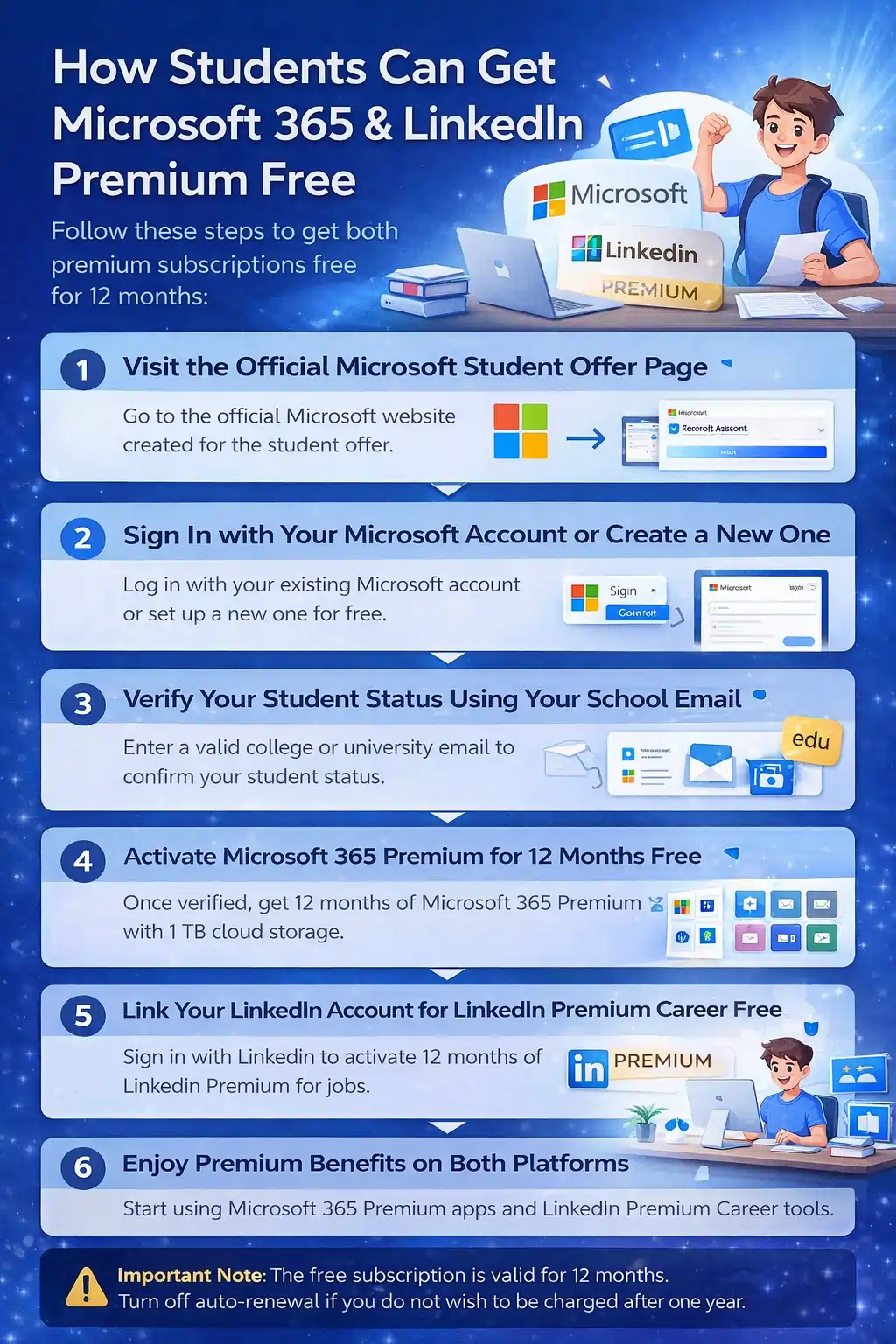
Microsoft has made this student offer easy to claim, but many students get confused during the verification stage. Follow the steps below carefully to activate both Microsoft 365 Premium and LinkedIn Premium Career without any issues.
Step 1: Visit the Official Microsoft Student Offer Page
Start by visiting the official Microsoft student offer page. This page is specifically created for students and includes the eligibility and verification process.
Always make sure you are on Microsoft’s official website. Avoid third-party links, as they may cause verification errors or security issues.
Step 2: Sign In with Your Microsoft Account (or Create One)
On the offer page, Microsoft will ask you to sign in using a Microsoft account.
- If you already have a Microsoft account (Outlook, Hotmail, or Live), you can sign in using those credentials.
- If you do not have a Microsoft account, you can create one for free in just a few minutes.
This account will be used to manage your Microsoft 365 subscription, OneDrive storage, and app access.
Step 3: Verify Your Student Status Using a College or University Email
After signing in, Microsoft will ask you to verify that you are a student.
You must enter a valid college or university email address, usually ending with .edu or your institution’s official domain.
Microsoft will send a verification email to this address. Open the email and click the verification link to confirm your student status.
Important points to remember:
- Personal email IDs like Gmail or Yahoo will not work
- Fake or inactive student emails are rejected
- Your institution must be supported by Microsoft’s verification system
Step 4: Activate Microsoft 365 Premium (12 Months Free)
Once your student status is verified successfully, Microsoft will automatically activate Microsoft 365 Premium for 12 months at no cost.
You will get full access to:
- Microsoft Word, Excel, PowerPoint, Outlook, and OneNote
- 1 TB of OneDrive cloud storage
- Microsoft apps on desktop, mobile, and web
No payment information is required at this stage.
Step 5: Link Your LinkedIn Account to Activate LinkedIn Premium Career
After Microsoft 365 Premium is activated, you will see an option to activate LinkedIn Premium Career.
To complete this step:
- Sign in with your existing LinkedIn account
or - Create a free LinkedIn account if you do not already have one
Once your LinkedIn account is linked, LinkedIn will automatically activate Premium Career for 12 months free.
This unlocks advanced job insights, recruiter messaging (InMail), and full access to LinkedIn Learning courses.
Step 6: Start Using Premium Benefits on Both Platforms
After completing all the steps, both subscriptions become active immediately.
You can now:
- Use Microsoft 365 apps for assignments, projects, and presentations
- Store and access files securely using OneDrive
- Learn new skills through LinkedIn Learning
- Message recruiters directly and track job applications
There is no waiting period- premium features are available right away.
Important Note for Students
The free subscription is valid for 12 months from the activation date.
If you do not want the subscription to continue as a paid plan after one year, make sure to turn off auto-renewal in both your Microsoft and LinkedIn account settings to avoid unexpected charges.
Also Read – Microsoft 365 vs Google Workspace – Which Is Better?
How Long Is the Free Subscription Valid?
The free subscription is valid for 12 months from the activation date. During this period, students can fully access all premium features of both Microsoft 365 and LinkedIn Premium Career.
After 12 months, the subscription may automatically renew as a paid plan, unless canceled manually.
Important Things Students Should Remember
Before activating this offer, students should keep the following points in mind:
- Always use a genuine student email ID
- Read the terms and conditions carefully
- Cancel auto-renewal if you don’t want to pay after one year
- Do not use fake details – verification is strict
- Availability may change or end at any time
Being aware of these points helps avoid unexpected charges in the future.
Is This Offer Worth It for Students?
Yes, absolutely.
The combined value of Microsoft 365 Premium and LinkedIn Premium Career is very high, and getting it free for 12 months is a rare opportunity. It helps students:
- Improve academic performance
- Learn industry-relevant skills
- Prepare for internships and jobs
- Build professional confidence
Final Conclusion
The Microsoft 365 and LinkedIn Premium free for students offer is one of the best opportunities available today for college students. It provides premium productivity tools, cloud storage, learning resources, and career development features – all at zero cost.
If you are a student, this is the perfect time to upgrade your academic and professional journey with premium tools trusted by millions worldwide.