If you are searching for n8n pricing, you are probably trying to answer one simple question: how much will n8n really cost me based on the way I want to use it? That is the right question to ask.
n8n is not priced in the same way as many other automation tools. Its cloud plans are built around workflow executions, and the platform highlights unlimited users, workflows, and steps across plans. n8n also offers a self-hosted path, including a free community option, but self-hosting still comes with real costs like hosting, maintenance, updates, and security work.
That is why many users compare:
- n8n cost
- n8n subscription
- n8n cloud pricing
- n8n open source pricing
- n8n vs Zapier pricing
- n8n cloud vs self hosted cost
This guide will help you understand all of that in simple words. We will cover what n8n pricing means, who should choose which setup, why cloud and self-hosted cost feel different, and how to pick the cheapest way to use n8n without making the wrong decision.
n8n Pricing at a Glance: Quick Answer for Busy Users
Here is the quick answer first.
n8n has a cloud pricing model and a self-hosted path. The cloud plans are paid and priced around workflow executions. The self-hosted community edition can be used without paying n8n for a subscription, but it still has infrastructure, maintenance, and technical costs. n8n also offers higher plans for business and enterprise needs.
At the same time, n8n documentation says there are both free and paid versions of self-hosted n8n. That means yes, n8n free to use can be true in a self-hosted setup, but only if you are ready to manage the technical side yourself.
Is n8n free to use?
Yes, n8n is free to use in its self-hosted Community Edition. n8n says a standard self-hosted version is available on GitHub, and its docs say the community edition includes almost the complete feature set except for certain paid features.
What is the cheapest way to use n8n?
The cheapest way to use n8n is usually:
- self-hosted, if you already have technical skill and low infrastructure needs
- cloud Starter, if you want speed, less setup work, and fewer maintenance problems
Who should use the n8n cloud?
n8n Cloud is better for people who want to start fast and avoid server work. n8n’s own docs recommend cloud if you are not experienced with managing servers, because self-hosting mistakes can cause downtime, security issues, or data loss.
🔥 LinkedIn Premium Business Plan 12 Months
Original Price ₹23,000 • Get it ₹8XXX
🤖 Gemini AI Advanced Pro Plan
Original Price ₹19,500 • Get it ₹8XXX
💼 LinkedIn Sales Navigator Core
Original Price ₹80,000 • Get it ₹2XXXX
🎨 Canva Pro Lifetime Access
Original Price ₹3,999 • Get it ₹4XX
📚 Coursera Plus Annual Plan
Original Price ₹33,000 • Get it ₹2XXX
✨ Adobe Creative Cloud All Apps
Original Price ₹59,000 • Get it ₹4XXX
What Is n8n and Why Are So Many Users Searching for n8n Pricing?
n8n is a workflow automation platform built for technical teams and advanced automation use cases. It supports visual building, code-friendly workflows, and AI workflow use cases. That makes it attractive for startups, automation builders, agencies, and internal operations teams.
People search for n8n pricing because n8n sits in an interesting middle space.
It is not just a simple beginner automation app. It is also not only an enterprise tool. It works for solo builders, startups, agencies, and technical teams. On top of that, n8n gives users two different directions: hosted cloud plans and self-hosted community or enterprise options.
Users want to know:
- What is n8n cost for real work?
- Which is better: n8n cloud or self-hosted?
- Why does n8n feel cheaper than some tools in some cases but not in all cases?
- Is n8n open source pricing really free?
- How does n8n vs Zapier pricing compare?
These are not small questions. A wrong decision can cost more money, more time, and more technical stress later.
How n8n Pricing Works in 2026
The most important thing to understand is this: n8n pricing is based mainly on workflow executions. It is not just about how many workflows you build. n8n also says its plans now come with unlimited workflows, unlimited steps, and unlimited users.
n8n’s current pricing page says:
- all plans include unlimited users and workflows
- every integration is included
- pricing is based on monthly workflow executions
- annual billing saves 17% compared with monthly billing
That changes how people should think about n8n cost.
With many tools, you ask, “How many team members do I need?” With n8n, the better question is, “How many workflow runs will I use, and how complex is my setup from an operations point of view?” That is why n8n can look simple at first but becomes more strategic when your automation grows.
What counts in n8n pricing?
The main billing logic is workflow executions. n8n explicitly says pricing is based on monthly workflow executions, regardless of complexity. This matters because it can feel more predictable for some use cases. If you build longer workflows with many steps, that does not automatically mean your n8n bill explodes in the same way some task-based tools can feel expensive as you scale.
Does n8n charge per user?
n8n highlights unlimited users on its pricing model, so it does not work like many tools that charge extra for every team member.
Why does n8n pricing feel different?
Because many automation platforms are easier to start with, but they often become more expensive as automation grows. n8n tries to stand out by giving:
- unlimited steps
- unlimited workflows
- unlimited users
- more control through self-hosting options
For technical users, that can feel more flexible. For beginners, it can also feel confusing at first.
Also Read – Notion Premium Subscription Service for Teams & Individuals
🔥 LinkedIn Premium Business Plan 12 Months
Original Price ₹23,000 • Get it ₹8XXX
🤖 Gemini AI Advanced Pro Plan
Original Price ₹19,500 • Get it ₹8XXX
💼 LinkedIn Sales Navigator Core
Original Price ₹80,000 • Get it ₹2XXXX
🎨 Canva Pro Lifetime Access
Original Price ₹3,999 • Get it ₹4XX
📚 Coursera Plus Annual Plan
Original Price ₹33,000 • Get it ₹2XXX
✨ Adobe Creative Cloud All Apps
Original Price ₹59,000 • Get it ₹4XXX
n8n Cloud Pricing Plans Explained
If you want the easiest setup, you will likely look at n8n cloud pricing first.
The official pricing page currently shows:
| Plan | Best for | Hosting | Key pricing logic |
| Starter | getting started | hosted by n8n | 2.5K workflow executions |
| Pro | solo builders and small teams | hosted by n8n | custom executions |
| Business | growing teams and SMBs | self-hosted license path in current plan wording | higher capabilities and quota model |
| Enterprise | strict compliance and governance needs | cloud or self-hosted | custom executions and custom sales plan |
The Starter plan includes 2.5K workflow executions, 1 shared project, 5 concurrent executions, and forum support. The Pro plan includes more shared projects, more concurrency, workflow history, execution search, admin roles, and a custom number of workflow executions.
Which n8n cloud plan is best for beginners?
The Starter plan is clearly built for people who want to test and launch simple workflows without heavy technical work. If you are new and want hosted convenience, this is the easiest entry point.
Which plan is better for growing teams?
The Pro plan is better when:
- workflows are already running in production
- more team access is needed
- you want workflow history and execution search
- you need more concurrency and more control
n8n Open Source Pricing: Is Self-Hosted n8n Really Free?
This is where many users get excited.
Yes, n8n offers a self-hosted option, and documentation confirms there are free and paid versions of self-hosted n8n. That is why many people search n8n open source pricing or ask is n8n free to use.
But here is the real answer: self-hosted n8n can be free in license cost, yet it is not always free in total cost.
What costs still exist in self-hosted n8n?
Even if you avoid a cloud subscription, self-hosted n8n is not completely free in real use. You may still need to pay for VPS or server hosting, database and storage setup, backups, monitoring tools, regular updates, and security hardening. On top of that, there is also the cost of time spent fixing issues, managing the setup, and keeping everything running smoothly.
n8n’s hosting docs make it clear that self-hosting requires knowledge around servers, containers, scaling, security, and app configuration. n8n also recommends self-hosting mainly for expert users.
When does “free” become expensive?
Self-hosting becomes expensive when:
- you do not already know server management
- your workflows are important to business operations
- downtime hurts your team
- your automation volume grows
- you need better reliability and security
This is why n8n cloud vs self hosted cost should not be judged only by subscription price.
🔥 LinkedIn Premium Business Plan 12 Months
Original Price ₹23,000 • Get it ₹8XXX
🤖 Gemini AI Advanced Pro Plan
Original Price ₹19,500 • Get it ₹8XXX
💼 LinkedIn Sales Navigator Core
Original Price ₹80,000 • Get it ₹2XXXX
🎨 Canva Pro Lifetime Access
Original Price ₹3,999 • Get it ₹4XX
📚 Coursera Plus Annual Plan
Original Price ₹33,000 • Get it ₹2XXX
✨ Adobe Creative Cloud All Apps
Original Price ₹59,000 • Get it ₹4XXX
n8n Cloud vs Self-Hosted Cost: Which Option Is Actually Better?
This is one of the most important buying questions. The right answer depends less on sticker price and more on your situation.
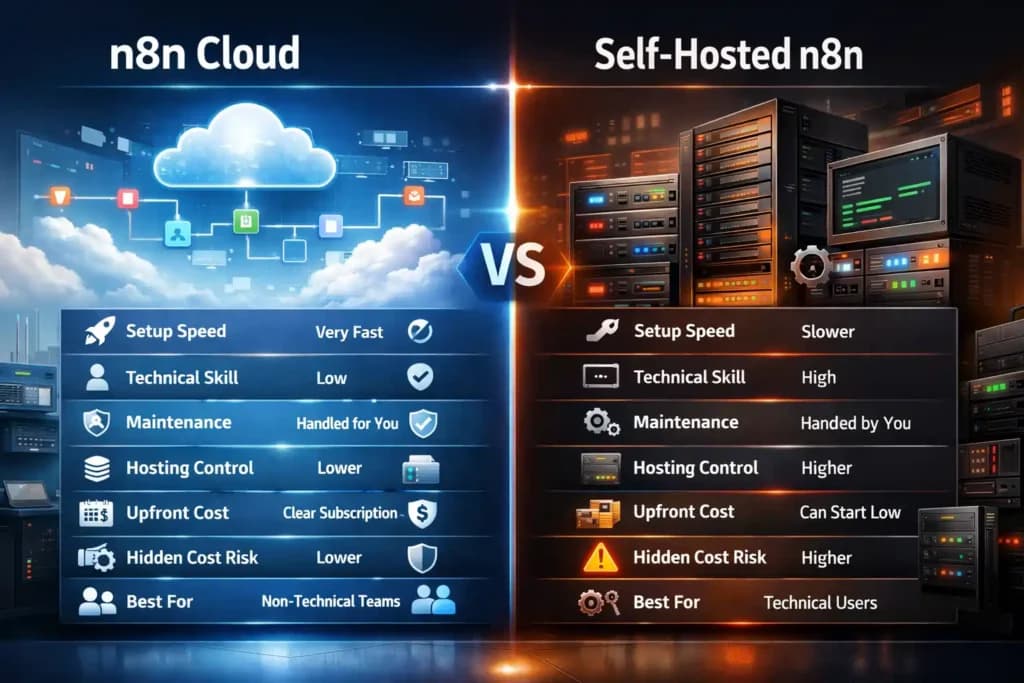
n8n Cloud vs Self-Hosted: Quick comparison
| Factor | n8n Cloud | Self-Hosted n8n |
| Setup speed | very fast | slower |
| Technical skill needed | low | high |
| Maintenance | handled for you | handled by you |
| Hosting control | lower | higher |
| Upfront cost | clear monthly subscription | can start low |
| Hidden cost risk | lower | higher |
| Best for | non-technical or busy teams | technical users and advanced control |
This comparison is supported by n8n’s own docs, which say self-hosting requires technical knowledge and that cloud is recommended if you are not experienced in managing servers.
Which option is cheaper for solo users?
It depends.
A technical solo builder may find self-hosted n8n cheaper, especially if usage is light and server cost is already covered.
A non-technical solo user may spend less overall with cloud, because time also has a cost. If you spend days learning hosting just to save a small amount, that is not always a smart saving.
Which option is better for startups?
For early startups, cloud is often the better first step because it reduces operational overhead. For more technical startups with strong internal ops and privacy needs, self-hosted can become attractive later. n8n also offers a startup plan for qualifying teams, which makes cloud more competitive for growing startups.
Also Read – What Is Lovable AI? The AI Web Engineer That Builds Apps for You
How Much Does n8n Really Cost for Different Users?

This is where the pricing discussion becomes more useful. The right n8n subscription depends on your type of work.
n8n cost for freelancers
Freelancers usually want:
- simple automation
- low monthly cost
- less setup time
- enough flexibility for client work
For this group, cloud Starter or Pro often makes sense because it saves time and removes server stress.
n8n pricing for startups
Startups care about:
- growth
- team use
- reliable workflows
- lower tool cost at scale
That is why n8n pricing for startups is a common search. The startup discount can make cloud much more attractive for early-stage teams.
n8n cost for agencies
Agencies often need:
- many workflows
- shared use
- client delivery
- stable uptime
- fast troubleshooting
For them, Pro or higher plans may be more practical than community self-hosting, unless they already have a strong technical team.
n8n pricing for internal business teams
For internal ops teams, the biggest value is often not the software fee itself. It is the time saved through automation. In that case, a higher n8n plan can still be cost-effective if it reduces manual work.
What Is the Cheapest Way to Use n8n?
Many users search this exact question: cheapest way to use n8n.
The answer is not the same for everyone.
The cheapest way to use n8n for technical users
If you already know Docker, servers, backups, and security basics, self-hosted n8n can be the lowest direct software cost. n8n even provides self-hosted guides and starter kits for users building these environments.
The cheapest way to use n8n for non-technical users
For most non-technical users, cloud is often cheaper in real life because:
- setup is faster
- there is less maintenance
- you avoid downtime from mistakes
- you do not need to keep updating the platform yourself
Common mistakes that increase n8n cost
- choosing self-hosted without technical skill
- ignoring maintenance time
- underestimating workflow growth
- looking only at monthly price, not total ownership cost
- moving to complex setups too early
Also Read – How to Use Notion for Project Management
n8n vs Zapier Pricing: Which One Gives Better Value?
A lot of users compare n8n vs Zapier pricing because both tools solve workflow automation, but they do it in different ways.
Zapier’s pricing page shows a free plan with 100 tasks per month, while n8n’s official model focuses on workflow executions and also offers self-hosting.
n8n vs Zapier pricing comparison
| Point | n8n | Zapier |
| Main pricing idea | workflow executions | tasks |
| Free option | self-hosted free path, cloud trial/entry | free forever plan |
| Self-hosting | yes | not core model |
| Users/workflows | unlimited on pricing model | varies by plan style |
| Best for | technical flexibility | fast and simple no-code start |
n8n also publicly explained that its newer pricing focuses on unlimited workflows, steps, and users. Zapier, on the other hand, continues to use task-based logic and has also introduced pay-per-task billing on paid plans.
Which is cheaper for low-volume automation?
For simple low-volume automations, Zapier can still feel approachable, especially for non-technical users.
For users building more advanced, longer, or technical workflows, n8n may offer stronger value because its pricing model is not tied to every action in the same way task-based systems feel. That is especially relevant when workflows become deeper and more custom. This is an inference based on each company’s pricing unit and feature structure.
Which is better for technical users?
n8n is usually stronger for technical users because it supports self-hosting, code steps, CLI and API control, custom nodes in self-hosted use, and deeper operational flexibility.
Is n8n a Good Pricing Choice for Startups?
For many early-stage teams, yes.
Why? Because startups usually want:
- lower operating cost
- more automation
- room to scale
- fewer tool limits
- better flexibility
n8n’s startup program gives eligible companies discounted access to the Business plan, which can make it a strong choice for serious automation use. Eligibility includes fewer than 20 employees and less than €5M in total funding, according to n8n support.
When should startups choose n8n Cloud?
Choose n8n Cloud when speed matters and you want to get started without spending time on server setup or technical maintenance. It is a good option for small teams that want a simple and reliable way to run automation without managing hosting, updates, or security on their own. Cloud also makes more sense when your workflows start becoming important to daily operations, because a managed setup helps reduce technical stress and lets your team focus more on work and less on infrastructure.
When should startups choose self-hosted n8n?
Choose self-hosted n8n when you already have technical skill and feel comfortable managing servers, updates, and the overall setup on your own. It is a better option for users who care more about privacy, control, and flexibility than simple convenience. If you want to manage the full environment yourself and do not mind taking responsibility for hosting, maintenance, and updates, self-hosted n8n can be the right choice.
Also Read – How to Use Microsoft 365 for Remote Work (Complete Practical Guide)
Who Should Choose Which n8n Pricing Option?
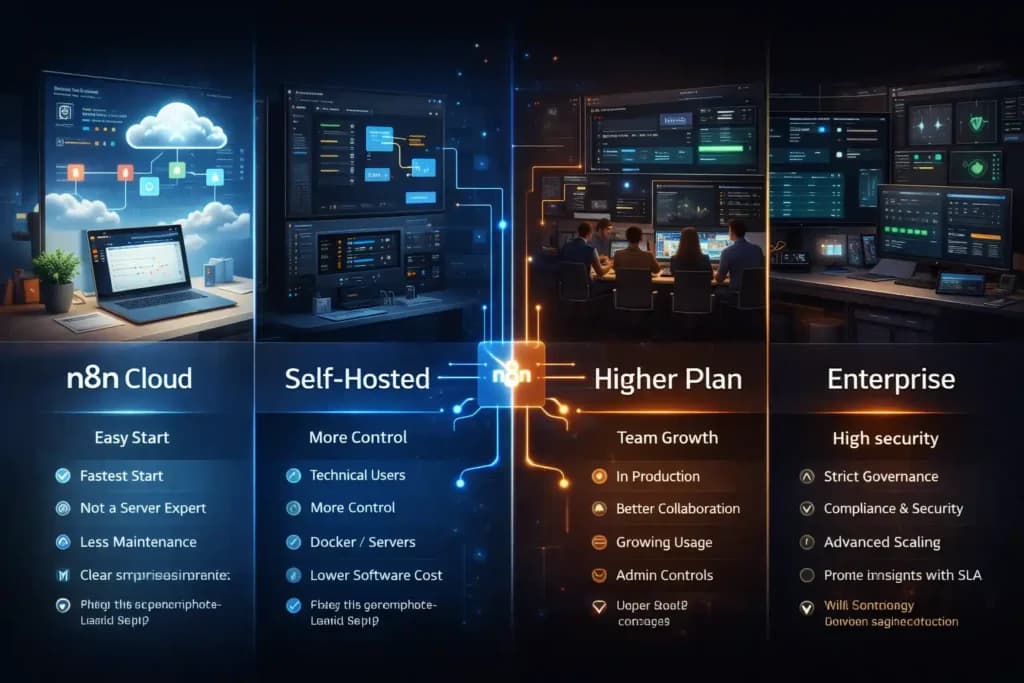
This is the easiest decision guide.
Choose n8n Cloud if…
- you want the fastest start
- you are not a server expert
- you want less maintenance
- you care about ease more than deep hosting control
- you want predictable subscription-based setup
Choose self-hosted n8n if…
- you are technical
- you want more control
- you are comfortable with Docker and servers
- you want to keep software cost low
- you can manage security and updates yourself
Choose a higher n8n plan if…
- your automation runs in production
- your team needs better collaboration
- your workflow usage is growing
- you need history, search, and admin controls
Choose Enterprise if:
- you need strict governance
- you need compliance and security controls
- you want advanced scaling and support with SLA
- you need high concurrency and longer insights retention
Hidden Costs You Should Check Before Choosing an n8n Subscription
One of the biggest mistakes people make with n8n pricing is looking only at the plan page.
Real cost also includes:
| Hidden Cost Area | Why It Matters |
| Maintenance time | updates and fixes take real hours |
| Security work | poor setup can create risk |
| Downtime | failed automation can affect work |
| Scaling needs | more usage can require better infrastructure |
| Developer effort | technical time is also a cost |
n8n’s docs directly mention update discipline, server knowledge, scaling, and security as part of self-hosting. They even recommend regular updating and testing because updates can include important fixes and breaking changes.
That is why the cheapest-looking setup is not always the cheapest in practice.
Also Read – How to Use Superhuman for Faster Email
Why Many Buyers Also Explore PremiumToolsHub Before Choosing a Tool
If you are comparing automation tools, design tools, AI tools, or business subscriptions, price is usually not the only factor. People also care about trust, support, and smooth payment.
That is where PremiumToolsHub becomes useful.
PremiumToolsHub is a website that provides premium tools at a huge discounted price, along with a proper payment invoice and full support. For users who want value without confusion, it can be a practical place to explore premium subscriptions more easily.
Frequently Asked Questions About n8n Pricing
Is n8n free to use?
Yes, n8n can be free to use through its self-hosted community version. But even then, you may still spend money on hosting, maintenance, backups, and technical setup.
What is the difference between n8n cloud pricing and self-hosted cost?
n8n Cloud comes with a fixed hosted setup, so it is easier to start and manage. Self-hosted can lower direct subscription cost, but you handle servers, updates, security, and maintenance on your own.
Does n8n charge per user?
n8n pricing is not mainly based on per-user billing like many other tools. It highlights unlimited users, workflows, and steps, with pricing focused more on workflow executions.
Is n8n cheaper than Zapier?
n8n can be cheaper for technical users, complex automations, or self-hosted setups. But for simple workflows and low usage, Zapier may feel easier and sometimes more cost-effective.
What is the cheapest way to use n8n?
The cheapest option is usually self-hosted n8n if you already have technical knowledge and can manage the setup yourself. For non-technical users, the cloud Starter plan can be a better low-cost and low-stress option.
Does n8n offer startup pricing?
Yes, n8n offers a startup plan for eligible early-stage companies. This can be a strong option for startups that want advanced automation at a lower cost than standard business-level pricing.
Final Verdict: Is n8n Pricing Worth It in 2026?
Yes, n8n Pricing is worth serious attention because it offers something many automation users want: flexibility.
If you want easy setup and less technical responsibility, n8n cloud pricing makes sense. If you are technical and want more control, n8n open source pricing through self-hosting can be very attractive. If you are comparing n8n vs Zapier pricing, n8n often looks stronger for technical users and teams that want deeper control, while Zapier remains strong for quick and simple no-code automation.
So the real answer is:
- solo users should compare Starter cloud with self-hosted community edition
- startups should compare cloud ease with startup or business-level growth needs
- technical teams should look closely at self-hosted, business, and enterprise paths
- users comparing n8n vs Zapier pricing should focus on executions vs tasks, not just headline price
If your goal is to find the best value, do not ask only, “What is the n8n cost?”
Ask this instead: Which n8n setup gives me the right mix of price, ease, control, and future growth?
That is the decision that saves more money in the long run.